
Mobile install guide
Spinrise App Install Guide for Australia
Short answer first, because it saves you a download you should not make: there is no Spinrise APK, and no listing on Google Play or the App Store. Spinrise ships a progressive web app you install from the casino itself in about twenty seconds.
There Is No Spinrise APK to Download
No APK exists. Nobody at Spinrise has ever published one, and the operator's site serves no installer file of any kind.
Here is what is actually there. The casino domain serves a /manifest.json declaring display: standalone, with maskable icons at several sizes and a mobile screenshot. That is the fingerprint of an installable web app, and the only install route the operator publishes. No package name, no signing certificate.
So when a page tells you to enable Unknown Sources and drag a 200 MB file onto your phone, it describes something that does not exist. I would rather state that flatly than politely.
Do not install a Spinrise APK from anywhere. Pages such as appspinrise.com, apkspinrise.com and spinriseau.com walk you through a native download flow the operator never built. Following those steps means sideloading an unsigned file from a site that is not the casino. Whatever it is, Spinrise did not make it.
What you should do instead takes one tap. Open the casino in your phone's normal browser, use the operator's own install control, and you are done — same account, same balance, same lobby, behind an icon.
What the Spinrise Casino App Actually Is
Strip away the jargon and a progressive web app is a bookmark with ambitions. Your phone stores an icon, a small manifest describing how the site should look, and a cache of interface files. Tap the icon and the casino opens full-screen — no address bar, no tabs, no browser furniture.
The part people miss: it updates itself. Nothing is shipped, so no stale version sits on your phone.
Why do offshore casinos build these? Because the alternative is closed to them. Apple and Google will not carry real-money gambling apps aimed at Australian players from operators without an Australian licence, and Spinrise runs on a Tobique Gaming Commission licence held by Metlait SRL. A web app sidesteps the store entirely.
What you gain: a one-tap launch, more screen for the reels, a session that tends to stay signed in. What you do not gain: exclusive games, faster payouts, an offline mode, or any app-only bonus.
Installing the Spinrise App on Android
Chrome makes this easy, and the casino offers two ways in — a sidebar button and a prompt that appears on its own.
Open Spinrise in Chrome
Load the casino in Chrome rather than an in-app browser. Facebook, Instagram and Telegram open links in their own stripped-down viewers, and those cannot install anything.
Tap Install Application in the left menu
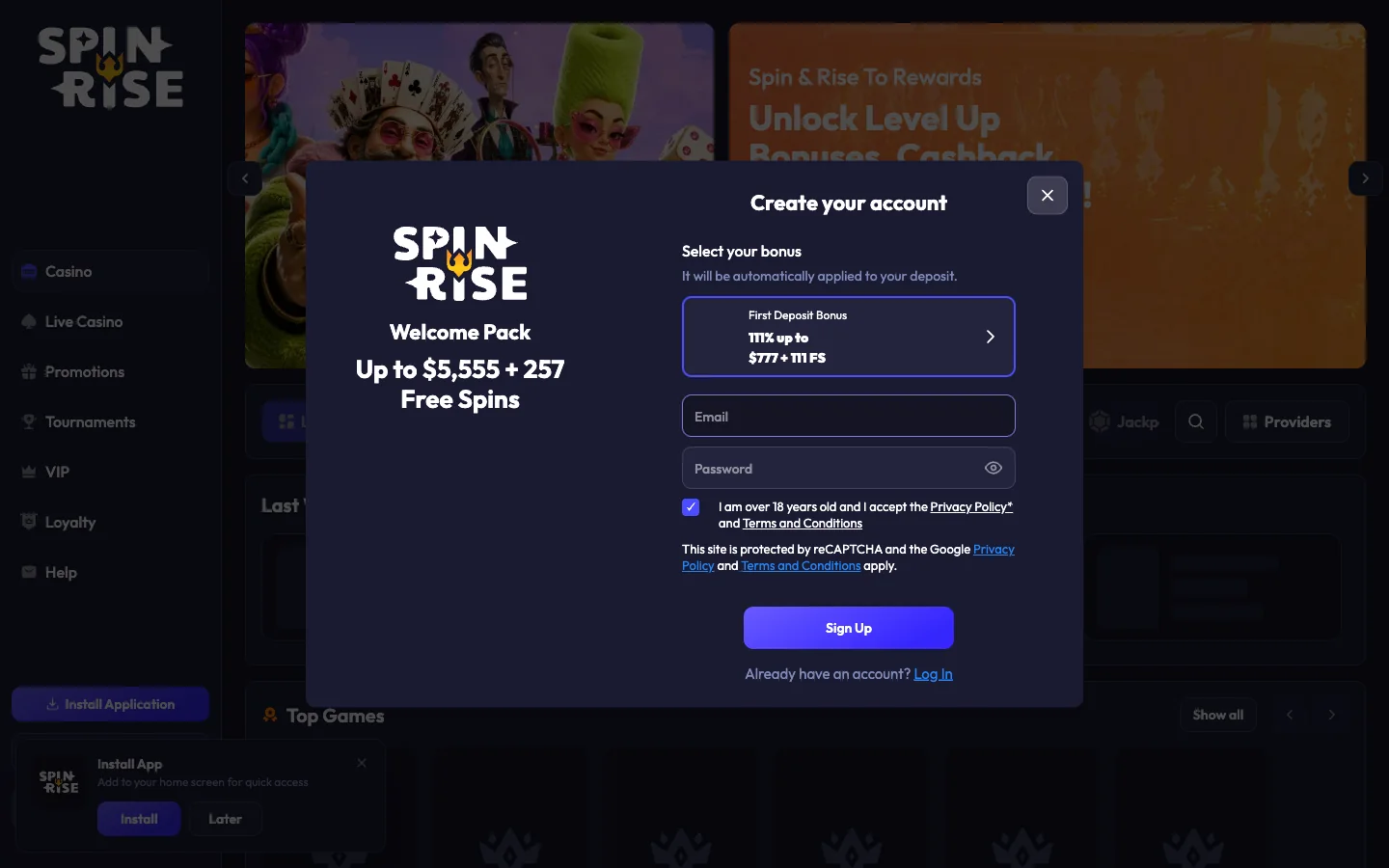
Open the sidebar and look under the Help and Loyalty entries for the Install Application button. If the Install App prompt has already slid in over the lobby, use that instead.
Choose Install rather than Later
The prompt reads Install App, with the line Add to your home screen for quick access underneath and two buttons. Later dismisses it and quietens the prompt for a while.
Confirm in Chrome's own dialog
Chrome raises a second, smaller sheet showing the Spinrise icon and name. This one belongs to the browser, not the casino. Tap Install and it closes immediately.
Find the icon on your home screen
The maskable icon lands on the home screen and in the app drawer, shaped to match your launcher. Opening it gives you the lobby full-screen with no address bar.
Not on Chrome? Samsung Internet buries the same function under its three-line menu as Add page to → Home screen, and usually skips the casino's prompt. Firefox for Android hides Install behind the address-bar menu on recent builds. Microsoft Edge behaves almost exactly like Chrome.
Installing the Spinrise Casino App on an iPhone or iPad
iOS has no install prompt to wait for. Apple hands the job to Safari's share sheet, so the casino's sidebar button will not do the work here — you drive it yourself.
Open Spinrise in Safari
Type the address into Safari yourself or tap through from here. Apple reserves home-screen installation for its own browser engine, so this first step decides whether the rest works.
Tap the Share icon
It is the square with an arrow rising out of it, sitting in the bottom toolbar on an iPhone and the top-right corner on an iPad. A sheet of options slides up.
Scroll down to Add to Home Screen
The entry sits below the sharing row, past Copy and Add to Bookmarks. On older iOS builds you may need to swipe the list upward before it appears.
Name the icon
Safari suggests a label pulled from the site. Shorten it to Spinrise so the text fits under the icon without truncating, then check the address shown underneath.
Tap Add
The icon appears on the last home screen page straight away. Launch it and the lobby fills the display, with the Safari toolbars gone entirely.
Two things bite iPhone owners. First, browser choice: on older iOS versions Chrome and Firefox do not offer Add to Home Screen the way Safari does, and people hunt for a menu item that was never there. Second, storage eviction — iOS clears a site's data after a long stretch of disuse. The icon survives; your session does not. Signing in again fixes it, and our login guide covers the messier failures.
A$5,555 and 257 free spins across three deposits — identical through the icon or a browser tab.
Claim the A$5,555 packageSpinrise App or Mobile Browser: What Changes
Honestly? Less than rival pages suggest. The games are identical, the account is the same, and the money moves the same way. What you gain is convenience and screen space.
| Feature | Installed app | Browser tab |
|---|---|---|
| Home-screen icon | Yes, maskable and launcher-shaped | Only a flat bookmark |
| Full-screen play | Yes, no address bar | No, browser chrome takes roughly 15% |
| Sign-in persistence | Usually holds across sessions | Lost when you clear browsing data |
| Storage used | Icon, manifest, cache — tens of MB | Same cache, shared with other sites |
| Updates | Silent, server-side | Silent, server-side |
| Push notifications | Possible on Android if allowed | Same permission, same behaviour |
| Works offline | No — shell may open, games cannot | No |
| Deposits and withdrawals | Identical cashier | Identical cashier |
One line on the cashier: Visa, Mastercard, Apple Pay, Google Pay, Neosurf, MiFinity, bank transfer and crypto, with PayID and POLi absent from both — detail on our payouts page.
Phones and Browsers That Run the Spinrise App
Support is broad. If your handset has had a security update this decade, it will install.
| Platform | Minimum version | Browsers that install it | How it behaves |
|---|---|---|---|
| Android phone or tablet | 8.0 Oreo | Chrome, Samsung Internet, Edge | Prompt appears by itself; icon in the drawer |
| Android, older builds | 5.0 to 7.1 | Chrome, inconsistently | May create a plain shortcut, no full-screen |
| iPhone and iPad | iOS or iPadOS 12.1 | Safari | Manual Add to Home Screen |
| Windows and macOS desktop | Any current release | Chrome, Edge | Install icon in the address bar |
| Firefox on desktop | Any current release | None | Site runs, installation not offered |
On an unsupported combination nothing breaks. You simply do not get the icon — the casino loads in the tab, the pokies spin, the cashier works. That is the quiet advantage of a web app: the fallback is the product.
Storage, Data and Battery on the Spinrise App
Real numbers against the invented ones. Installation costs almost nothing — icon and manifest are kilobytes, and the cache that follows sits in the tens of megabytes even after a long run of play. No 200 MB package is transferred, because none exists.
Data is the figure that matters. Every pokie loads its own art, animation and audio the first time, and a title like Elvis Frog TRUEWAYS pulls several megabytes before the first spin. Bounce between fifteen games in an evening and you have spent real allowance. Live tables are worse again, because video streams continuously.
Battery follows the same logic. Full-screen play at high brightness with constant animation drains a phone faster than messaging or video.
On a capped plan, four habits help:
- Play on home Wi-Fi where you can — a game you have already opened loads much lighter the second time.
- Pick a handful of pokies rather than sampling the whole lobby on mobile data.
- Skip live dealer tables away from Wi-Fi; the video stream is where the megabytes go.
- Drop the brightness a notch and turn off background refresh you do not need.
Fixing, Updating and Removing the Spinrise App
Most install problems belong to the browser rather than the casino, and clear quickly.
- No install prompt anywhere. Check whether the icon already sits on a home screen page you have forgotten. Then check you are not in a private window, because those refuse by design. Tapping Later also silences the prompt for a stretch.
- The icon vanished after a system update. Android launchers occasionally drop web-app icons while rebuilding the home screen. Nothing was uninstalled — check the app drawer, and reinstall if it is genuinely gone.
- Blank or white screen on launch. A half-written cache is the usual culprit. Clear the site's storage in your browser settings, then reopen the icon and let it rebuild.
- Signed out repeatedly on iPhone. That is iOS reclaiming storage from sites you have not opened recently. Launching it every week or two keeps the session alive.
- Games load but the screen stays boxed in. The shortcut was created without the manifest, usually by an older browser. Remove it and repeat the install from Chrome or Safari.
Updates need no attention. Because the whole thing is served rather than shipped, a pokie added to the lobby on Tuesday is there when you open the icon on Tuesday.
Removing it is just as light. On Android, long-press the icon and choose Uninstall; on iPhone, long-press, tap Remove App, then Delete. Your account, balance and any active bonus are untouched.
Spinrise App Questions Australians Ask
Yes, though not the kind you are picturing. Spinrise installs on Android as a progressive web app straight from the site, using Chrome's own install flow. You end up with a real icon in your app drawer and a full-screen casino, but nothing was downloaded from a store and no installer file ever touched your phone.
Nowhere, because it does not exist. The operator serves no .apk file and never has. Any site offering you a Spinrise APK either built that file itself or is pointing you at something unrelated, and installing it means handing a stranger permissions over your phone. Use the install button inside the casino instead.
No. Apple will not list real-money casino apps for the Australian market from operators without local licensing, and Spinrise holds a Tobique Gaming Commission licence rather than an Australian one. Searching the App Store surfaces only unrelated titles. The Safari Add to Home Screen route is the supported path on iPhone and iPad.
The installed version is the same site you already loaded in your browser, wrapped in an icon, so it carries no extra permissions and cannot reach your photos or contacts. The genuine risk lives entirely with fake APKs hosted on third-party sites. Install through the button inside the casino and you are running exactly what the browser runs.
No, the library is identical. All 157 titles we counted in the public Australian lobby load in the installed app exactly as they do in a tab, from Elvis Frog TRUEWAYS through to Aviator and the blackjack tables. Nothing is app-exclusive and nothing is held back. The category rails sit in the same order too.
Yes. The three-deposit package worth up to A$5,555 and 257 free spins behaves the same whether you deposit inside the installed app or a browser tab, and the bonus selector still appears at sign-up. Codes RISE, ROLLER, RISE77 and RISE55 all apply normally. The full terms sit on our bonus page.
Tens of megabytes at most, and far less on the day you install it. What lands on the device is an icon, a manifest and a cache holding interface files. Game assets stream while you play and grow that cache slowly. The 200 MB download some pages describe is fiction, because no package of that size exists.
Not for playing. Pokies and live tables need a live connection to the game server, so the reels will not turn without data. The cached shell may still open and show a loading screen rather than a browser error, which is cosmetic rather than useful. Treat it as an online-only casino, because that is what it is.
Four common reasons: it is already installed, you are browsing in a private or incognito window, your browser cannot install web apps at all, or you tapped Later earlier and the prompt has gone quiet. Switching to Chrome on Android or Safari on iOS fixes most cases, and clearing the site data brings the prompt back.
No, and there is nothing to update. Because the app is served rather than shipped, new pokies, promotions and interface changes arrive the moment you open it. There is no version number, no patch notes and no store queue to wait in. If something looks stale, close it fully and reopen to force a fresh fetch.
On Android, long-press the icon and choose Uninstall, then clear the site data in Chrome if you want the cache gone as well. On iPhone, long-press the icon, tap Remove App and confirm Delete. Neither action closes your casino account or touches your balance, which is a separate request to support.